
Birdeye vs Podium
A practical buyer’s guide to Birdeye vs Podium for reviews, messaging, webchat, AI, listings, payments, surveys, social media, pricing, integrations, and industry fit.
What was consolidated from the older ranking blog
The older blog targeted local SEO and review-management search intent around Birdeye vs Podium. Its useful content included the idea of comparing verified reviews, review generation, webchat, SMS texting, Facebook Messenger, ease of setup, administration, support quality, product roadmap direction, and the buyer conclusion that the best fit depends on business needs. This page preserves those search themes while replacing the old short blog copy with original, deeper comparison content.
Unique content preserved
Reviews, local SEO, messaging, webchat, business SMS, ease of use, support, roadmap, small-business fit, comprehensive reputation management, and ConvertLocal’s Birdeye implementation perspective.
Keywords preserved
Birdeye vs Podium, Podium alternatives, Birdeye comparison, reputation management software, review management software, Podium vs Birdeye pricing, Birdeye reviews, and Podium reviews.
Duplicate content avoided
The old article themes are rewritten as buyer guidance, tables, screenshots, use cases, and FAQs instead of copied paragraphs.
Birdeye vs Podium feature comparison
Feature packaging changes. Use this table as a buying framework, then confirm the exact plan, add-ons, limits, onboarding scope, contract terms, and integration behavior before signing.
| Category | Birdeye buying angle | Podium buying angle | Questions to ask |
|---|---|---|---|
| Reviews | Often evaluated for review requests, monitoring, response workflows, AI assistance, reporting, and multi-location reputation management. | Often evaluated for review generation connected to customer messaging and local lead response. | Can requests trigger from completed jobs, appointments, invoices, purchases, or service milestones? |
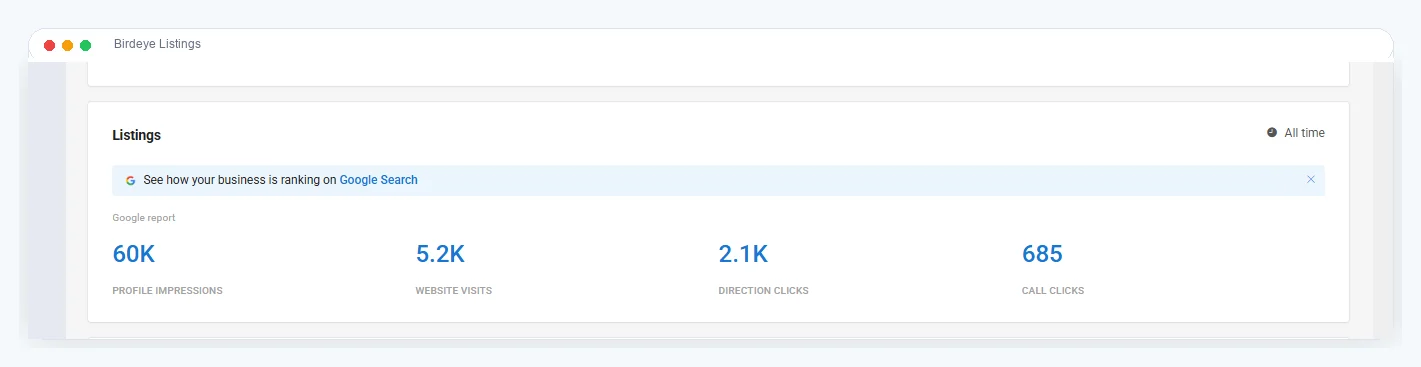
| Listings | Useful for businesses that want reviews plus business listing accuracy and local SEO visibility in one system. | Confirm whether listings depth matches your local SEO goals and quoted package. | Are Google Business Profile, directories, duplicate suppression, and location reporting included? |
| Messaging | Evaluate text, webchat, social, email, voicemail, routing, templates, team inboxes, and customer history. | Strong messaging-first market position; evaluate team inboxes, assignments, mobile use, and webchat-to-text workflows. | Can staff see, assign, and resolve conversations without losing context? |
| Webchat | Evaluate live chat, AI chat, conversion to text, routing, website lead capture, and handoff. | Evaluate webchat-to-text workflows, lead capture, routing, and response time reporting. | Does chat continue by SMS and notify the right team? |
| AI | Ask about AI for webchat, review replies, messaging, summaries, routing, and usage limits. | Ask which AI features are included, which are add-ons, and how handoff works. | What AI is actually included in the quote? |
| Payments | Evaluate payment links, payment reporting, conversation-to-payment workflow, and reconciliation needs. | Evaluate payment collection, payment links, fees, reporting, and how payments connect to messaging. | What are payment processing fees and operational limits? |
| Surveys | Useful when private feedback, NPS, customer experience measurement, and service recovery matter. | Confirm survey depth, reporting, and whether it is included or separate. | Can unhappy customers be routed privately before a public review? |
| Social media | Evaluate publishing, review sharing, AI captions, approvals, reporting, and location controls. | Confirm whether social features match your content and location-management needs. | Can one team manage social content across locations? |
| Integrations | Important for CRM, PMS, POS, field service, automotive, dental, healthcare, and scheduling systems. | Important for lead capture, payments, customer messaging, and existing operational systems. | What exact trigger starts the workflow? |
| Multi-location | Evaluate permissions, templates, location dashboards, reporting, listings, social, and integration rollout. | Evaluate location-level inboxes, routing, reporting, and permissions. | Will administration still work at 10, 50, or 500 locations? |
Buying rule: compare the real workflow your team will run every day, not just the feature names on a pricing page.
Use screenshots to inspect workflow depth
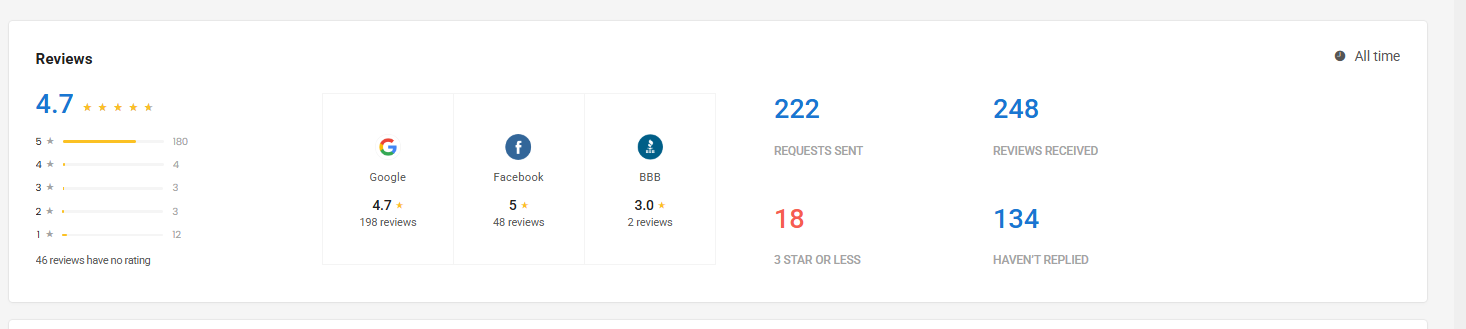
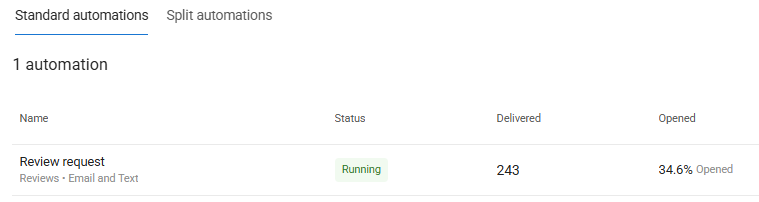
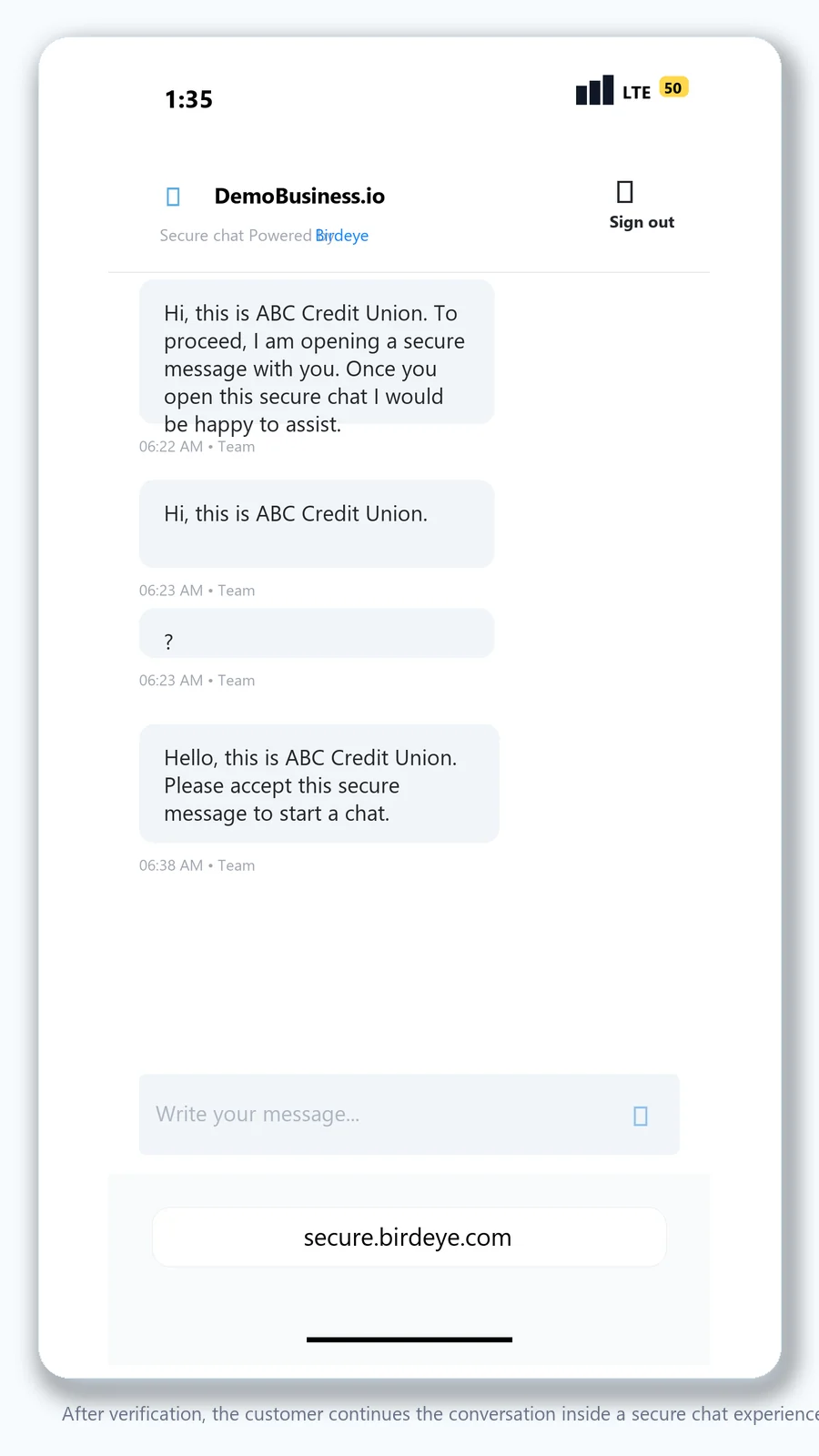
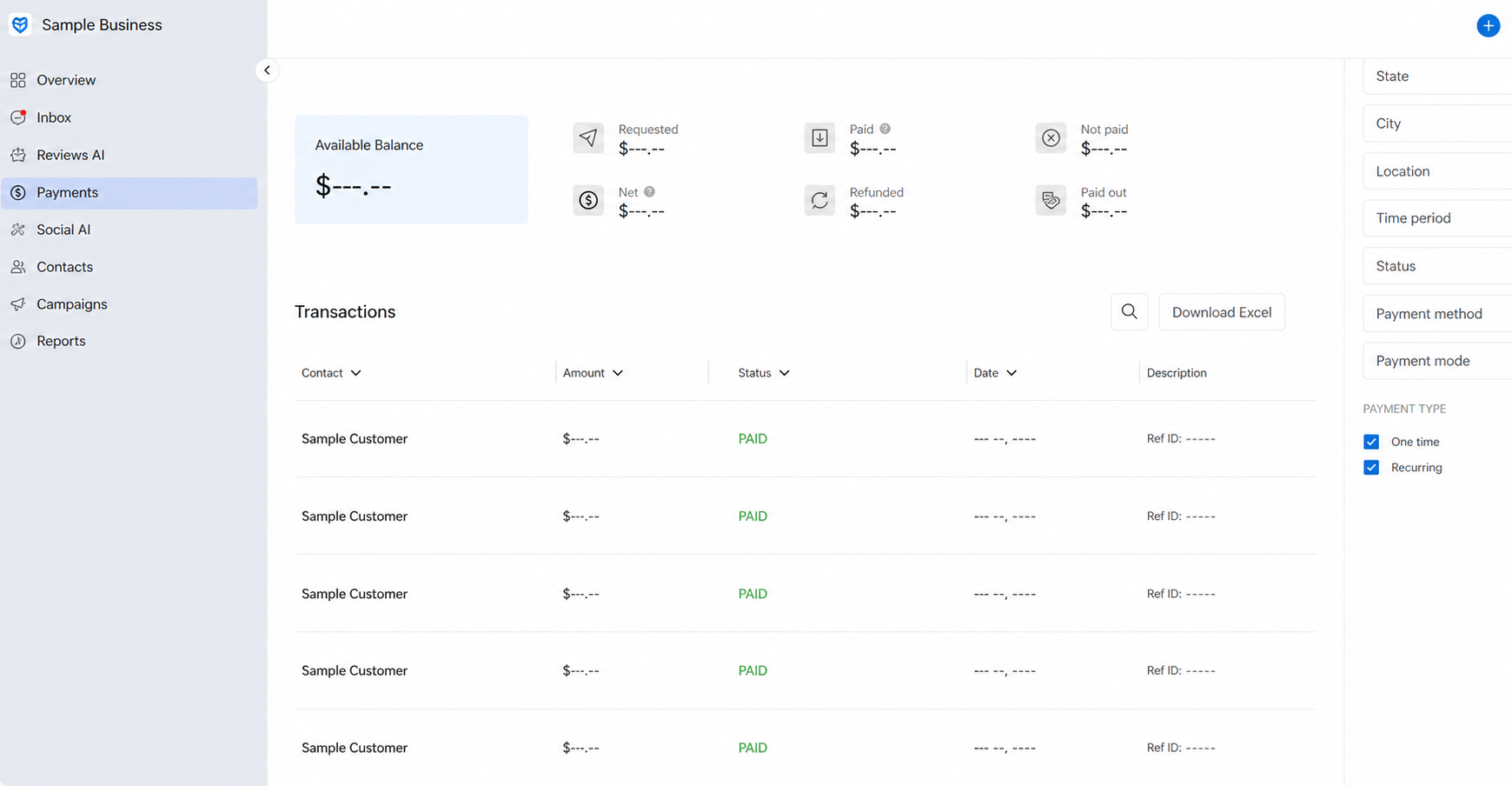
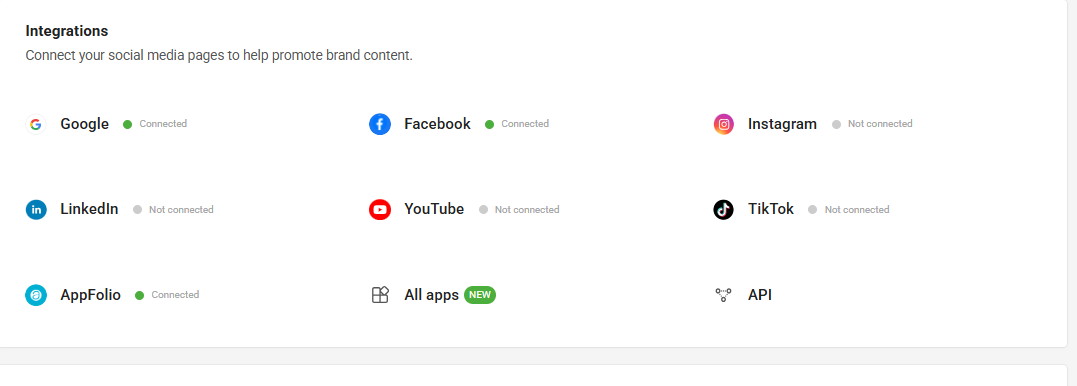
The original destination page and older blog did not expose a meaningful comparison-table or screenshot library of their own. To improve the consolidated page, ConvertLocal product screenshots were added where they help buyers evaluate reviews, listings, messaging, payments, and integrations.
Birdeye reviews vs Podium reviews: compare the full lifecycle
Most buyers start with one question: which platform will help us get more reviews? The better question is broader: which platform helps us request reviews at the right moment, respond consistently, learn from private feedback, report by location, and recover unhappy customer experiences before they become bigger problems?
Both Birdeye and Podium are commonly evaluated for review generation. Birdeye tends to be the stronger candidate when reputation management is part of a larger customer experience program involving listings, surveys, social media, AI, and multi-location reporting. Podium can make sense when the core workflow is messaging customers, asking for reviews, and keeping communication simple for a smaller team.
Request timing
Ask whether review requests can trigger after completed jobs, appointments, purchases, invoices, reservations, move-ins, repair orders, or service milestones.
Response workflow
Compare AI reply assistance, templates, approvals, brand voice, escalation paths, and manager visibility.
Reporting
Look for location-level trends, request volume, response gaps, rating movement, source reporting, and private feedback patterns.
Podium vs Birdeye pricing: what to compare before accepting a quote
Do not compare only the monthly platform fee. The true cost depends on included features, contacts, users, locations, AI, messaging volume, payment processing, integrations, onboarding, support, contract length, and what your staff can realistically operate after launch.
Included features
Confirm reviews, listings, webchat, AI, surveys, social, payments, integrations, reporting, mobile apps, and inbox tools.
Usage and limits
Ask about contacts, users, messages, locations, AI usage, templates, phone numbers, payment fees, and future growth.
Implementation value
A lower price is not lower cost if review requests, routing, integrations, or staff adoption never launch properly.
Best-fit scenarios by business type
| Business type | What matters most | How to compare Birdeye and Podium |
|---|---|---|
| Property management | Resident communication, maintenance follow-up, leasing, reviews, text-enabled numbers, and PMS triggers. | Evaluate AppFolio, Rent Manager, Entrata, Yardi, and other integration needs plus location/property reporting. |
| Automotive | Repair order completion, pickup reminders, review requests, payments, missed calls, and customer texting. | Ask how the platform connects to shop management systems, dealerships, collision workflows, and service advisors. |
| Home services | Completed jobs, technician follow-up, estimates, memberships, emergency calls, and review generation. | ServiceTitan, Housecall Pro, Jobber, FieldRoutes, and similar triggers may be the deciding factor. |
| Healthcare | Patient reminders, reviews, secure communication needs, reputation, surveys, and compliance-sensitive workflows. | Confirm healthcare integrations, permissions, secure chat behavior, and review request rules. |
| Agencies | Client reporting, multi-account administration, listings, reviews, social media, and scalable implementation. | Compare whether the platform supports repeatable workflows across multiple clients or brands. |
| Multi-location brands | Templates, permissions, reporting, local pages, listings, social publishing, and corporate oversight. | Confirm how the platform performs across many locations, teams, and regional operators. |
Who should choose Birdeye, and who should choose Podium?
Choose Birdeye if…
You want a broader reputation and customer experience platform covering reviews, listings, messaging, webchat, AI, surveys, social media, integrations, and multi-location workflows. Birdeye is especially worth evaluating when the business needs implementation depth, industry-specific automation, and reporting beyond simple review requests.
Choose Podium if…
Your team is primarily focused on customer messaging, webchat-to-text lead capture, simple review generation, and a package that fits your current team size and budget. Podium may be a practical fit when the business wants a messaging-first workflow and does not need the same breadth of listings, social, surveys, or multi-location operating controls.
Consider switching from Podium if…
You need broader reputation management, more local SEO and listings support, different AI packaging, deeper integrations, survey workflows, social media tools, or a more structured multi-location rollout.
Keep evaluating if…
You have not confirmed pricing, AI limits, contacts, users, message volume, payment fees, integrations, contract terms, onboarding scope, and who on your team will own daily replies.
For most reputation-led buyers, start with Birdeye. For messaging-first buyers, still compare Podium carefully.
If your search is “Birdeye vs Podium” because you want more reviews, better local visibility, AI-assisted communication, listings, surveys, social media, integrations, and multi-location reporting, Birdeye is usually the stronger platform to evaluate first. If your immediate priority is customer messaging, fast lead response, and text-based workflows, Podium remains a credible option, but you should still compare pricing, add-ons, integrations, and what happens when your needs expand.
ConvertLocal’s recommendation is to choose based on the workflow you need to launch, not the broadest feature list or the simplest sales pitch. Map your customer journey first, then evaluate which platform can automate it cleanly.
Related ConvertLocal resources
Use these pages to compare specific workflows and move from platform research to implementation planning.
Birdeye vs Podium FAQs
Is Birdeye better than Podium?
Birdeye is usually stronger for businesses that want a broader reputation, listings, social, AI, messaging, survey, and multi-location customer experience platform. Podium can still be a good fit for teams centered on customer messaging and simple lead response workflows.
Which platform is better for review management software?
Compare review request triggers, response workflows, reporting, private feedback, multi-location controls, and integrations. The best review management software is the one your team can reliably run after real customer events.
How should I compare Podium vs Birdeye pricing?
Ask what is included in the quoted package, including AI, contacts, users, locations, messaging, webchat, payments, surveys, social tools, listings, integrations, onboarding, support, and contract terms.
Is Birdeye a Podium alternative?
Yes. Birdeye is often evaluated as a Podium alternative by businesses that want reviews, messaging, webchat, AI, listings, surveys, social media, and customer experience workflows in one platform.
Which is better for multi-location businesses?
Multi-location teams should compare permissions, location-level inboxes, templates, review reporting, listings, social publishing, integrations, and administrative controls.
Can ConvertLocal help migrate or launch Birdeye?
Yes. ConvertLocal helps businesses evaluate fit, plan workflows, configure review automation, set up texting and webchat, connect integrations, test launch flows, and train teams.