
Use completed sales in The Edge to start configured Birdeye SMS review requests, email review requests, or customer feedback surveys without relying on associates to remember every follow-up.
Last updated June 20, 2026
What the Birdeye + The Edge integration does
The Edge helps jewelers manage store operations and completed transactions. Birdeye helps businesses request reviews, collect feedback, communicate with customers, and manage online reputation. The integration creates value by connecting a real customer milestone in The Edge to a configured follow-up workflow in Birdeye.
Instead of asking every associate to remember which customer should receive a review request, the store can use the transaction event as the starting point. This makes review generation more consistent across associates, days, and locations. It also helps the store measure how many requests were sent and how the program performs over time.
The sales associate completes the customer record and sale.
The supported completed transaction becomes the campaign trigger.
The contact enters the mapped location and campaign.
SMS, email, or both are sent immediately or after the configured delay.
The customer can provide feedback and share an authentic Google review.
The Edge transaction trigger and Birdeye campaign timing
The trigger identifies the event. The campaign controls what happens next. A store may choose to send immediately, delay the request for a defined number of hours, or schedule the follow-up at an appropriate time after the contact is added. Exact options depend on the current Birdeye campaign setup.
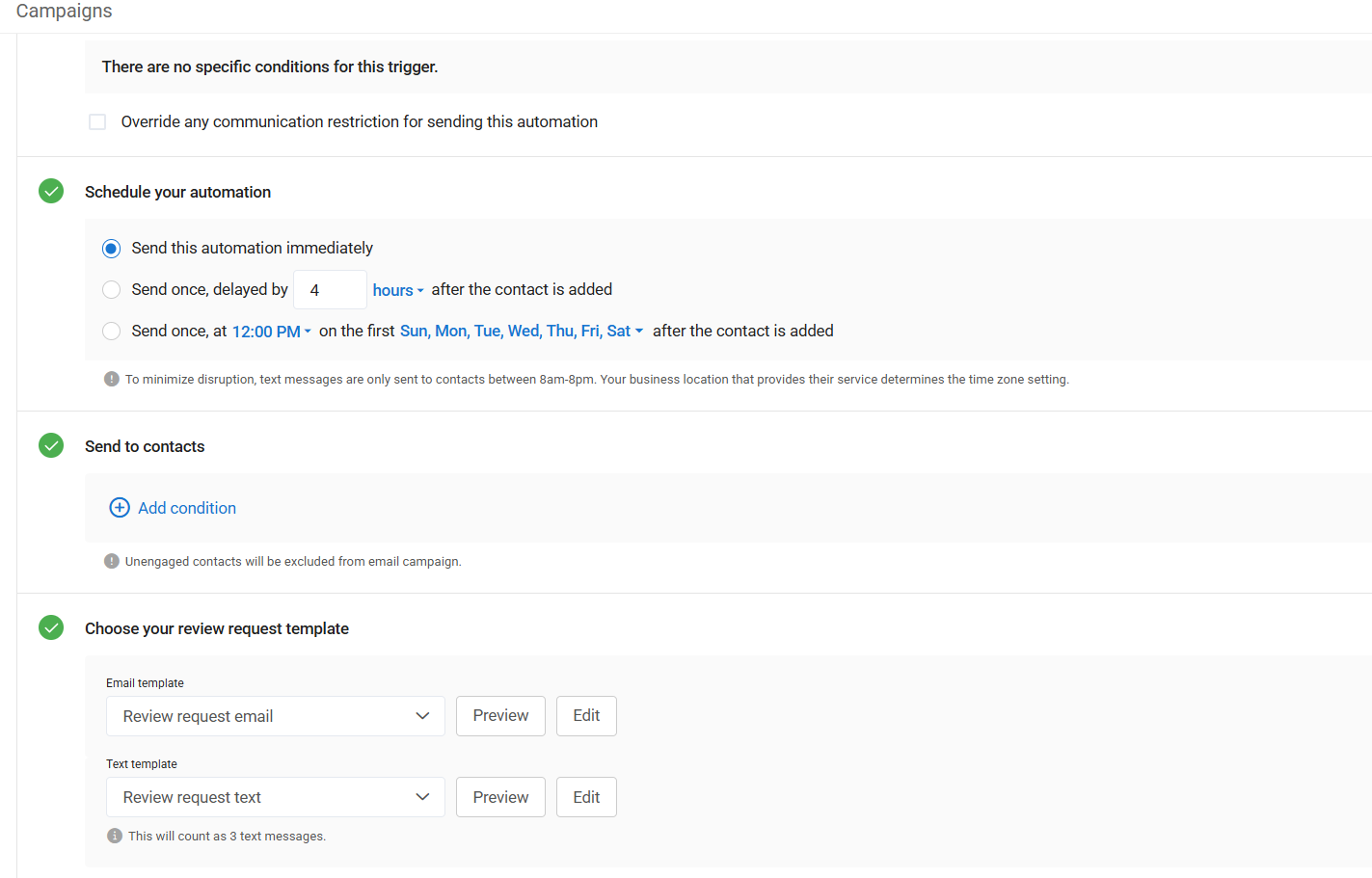
Automatic SMS review requests
Use concise text copy, the correct store identity, an approved review destination, and appropriate consent and opt-out practices.
Automatic email review requests
Use branded email follow-up for customers who prefer email or when the store wants a richer message.
Customer feedback surveys
Collect structured feedback when the goal is to understand the sales experience rather than only request a public review.
Delayed review timing
Delay the campaign when sizing, pickup, delivery, or another part of the experience should happen before the request.
Why this matters at the jewelry counter
Front desk and sales teams already handle repairs, pickups, appraisals, custom orders, sizing, phone calls, and walk-in customers. Manual review follow-up is easy to postpone. Transaction-triggered automation removes that memory task while still letting management control the campaign, timing, templates, locations, and review destinations.
The best program does not ask every transaction for the same thing. The store should decide which transaction types qualify, whether a delay is needed, which location owns the customer, and how service recovery works when a customer replies with a concern.
The Edge integration setup checklist
- Confirm The Edge and Birdeye account requirements
- Identify the supported completed transaction event
- Map each store to the correct Birdeye location
- Review customer phone and email data quality
- Select Google review destinations by location
- Choose SMS, email, survey, or combined campaigns
- Set immediate or delayed campaign timing
- Write jewelry-specific message templates
- Define consent and opt-out procedures
- Test several transaction and customer scenarios
- Train managers on replies and service recovery
- Review campaign results after launch
Common setup mistakes
Triggering too early
If the customer still needs sizing, pickup, or delivery, a delayed request may better reflect the complete experience.
Sending to the wrong Google profile
Multi-location stores must map customers to the correct location and review destination.
Using generic retail copy
Jewelry messages should reflect trust, service, and the actual relationship without sounding mass-produced.
No owner for negative feedback
Automation must include a human recovery process for customers who need help.
Frequently asked questions
Does Birdeye integrate with The Edge?
Birdeye supports an integration workflow for The Edge. The transaction trigger and available campaign actions should be confirmed for the store’s current The Edge and Birdeye setup before launch.
Can Birdeye automatically send review requests after a jewelry sale?
Yes. A completed transaction in The Edge can be used as the event that adds the customer to a configured Birdeye review request or feedback campaign.
Can customers receive review requests by text message?
Yes. Review requests can be configured for SMS and email, subject to the business’s messaging permissions, consent practices, contact data, and current Birdeye capabilities.
Can jewelry stores collect customer feedback automatically?
Yes. A store can use a post-transaction survey or feedback workflow to learn about the experience and route follow-up to the appropriate team.
Can Birdeye help jewelry stores rank higher on Google?
A steady flow of recent, authentic reviews can strengthen trust and local-search visibility. Rankings also depend on relevance, proximity, website quality, Google Business Profile health, competition, and other factors.
Can jewelers send payment links by text?
Eligible jewelry stores can use supported Birdeye Payments workflows to send payment links by text for deposits, balances, repairs, layaway, or special orders. Current eligibility and processing terms must be confirmed.
Can ConvertLocal set up The Edge integration?
Yes. ConvertLocal can help map the transaction trigger, review destinations, templates, timing, users, locations, testing, and launch process.