
Birdeye + RingCentral: Calling and Texting From One Shared Business Number
Connect eligible RingCentral calling workflows with Birdeye Inbox so teams can call, text, and manage customer conversations without relying on personal phones.
Last updated: June 19, 2026
What is the Birdeye + RingCentral integration?
The Birdeye and RingCentral workflow can connect eligible business calling capabilities with Birdeye Inbox. Staff can work from a shared customer communication environment instead of switching between unrelated phone tools, individual text threads, webchat tabs, and personal devices.
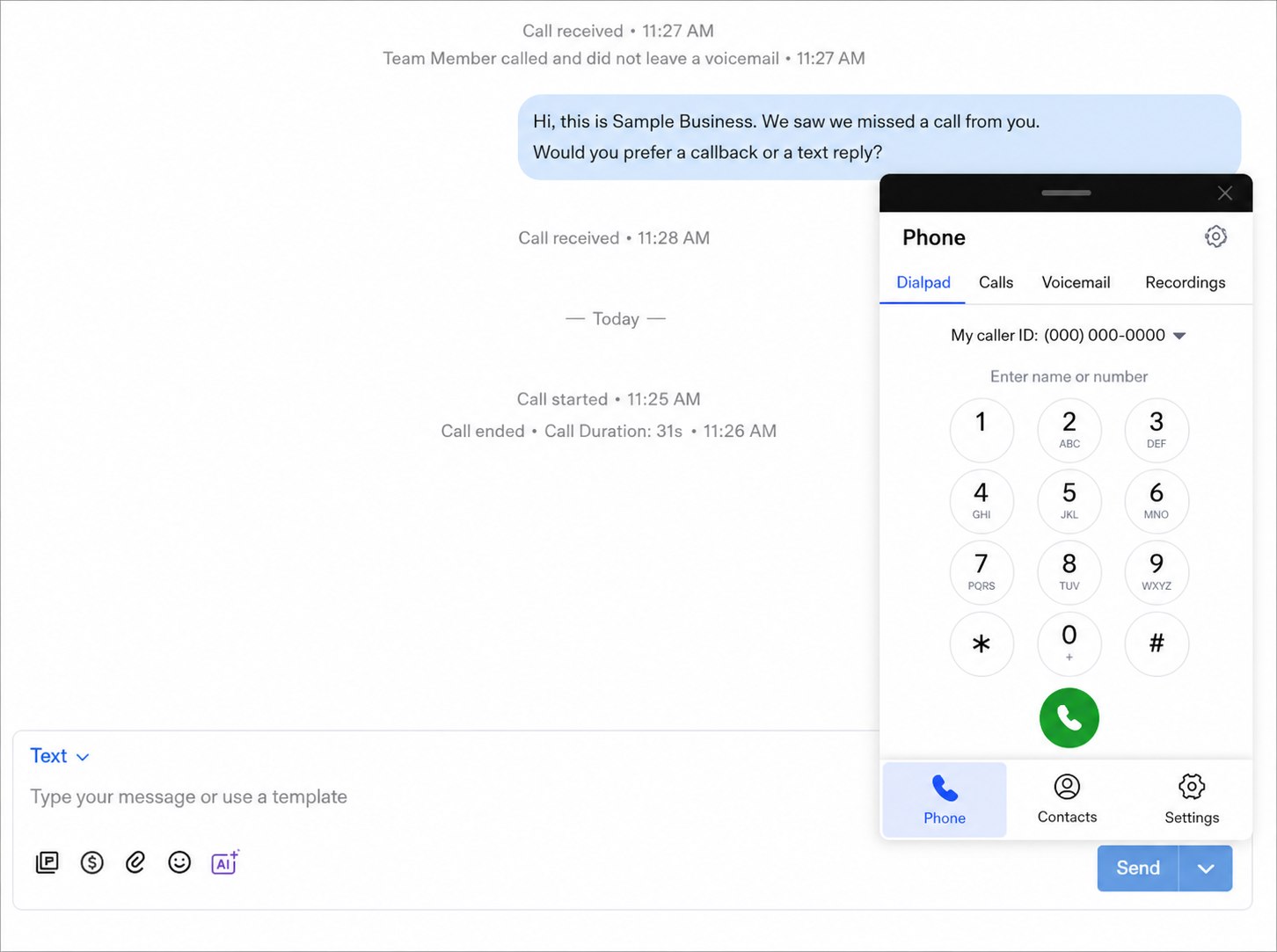
Depending on the RingCentral setup, number eligibility, Birdeye products, permissions, and supported account configuration, employees may be able to place calls through an Inbox dialer, handle texts from the connected business number, view call activity, and continue conversations on desktop or mobile. Supported workflows vary by account, so ConvertLocal begins with an eligibility and configuration review.
Bring business calling and texting into one team workflow
ConvertLocal helps businesses confirm eligibility, configure the Birdeye workflow, train employees, and connect payments, calling, texting, webchat, and reviews into a practical customer communication system.
Use the same business identity for calls and texts where supported
Customers should not need to guess which number belongs to the business. When the connected RingCentral number and Birdeye messaging configuration support it, the team may be able to use the same business number for voice and text conversations. That creates a more recognizable experience and keeps communication tied to the company rather than an employee’s personal phone.
Call from Birdeye Inbox
Use the supported dialer to start customer calls without leaving the conversation workspace.
Text from the shared number
Continue eligible customer conversations through business texting with team visibility.
Handle missed-call follow-up
Move a missed call into a supported callback or text conversation while the customer intent is still fresh.
Desktop pop-up dialer and mobile workflows
A desktop pop-up dialer can make outbound calling faster because the employee can stay inside the customer record and conversation context. The supported mobile app workflow can help authorized staff call or text when they are away from the desk. This is useful for distributed sales teams, service coordinators, front desks, managers, and staff moving between locations.
Availability of caller ID, call history, voicemail, recordings, routing, extensions, mobile calling, and specific dialer controls depends on the RingCentral and Birdeye setup. Businesses should also establish call-recording consent, retention, supervision, and employee-access policies before enabling those features.
Desktop calling
Open the dialer beside the Inbox conversation and call without searching for the number in another system.
Mobile calling and texting
Use supported mobile workflows while keeping the customer relationship connected to the business.
Shared conversation history
Give authorized employees context so customers do not have to repeat the same story.
Team assignment
Clarify which person owns the next callback, text reply, webchat lead, or service follow-up.
Bring business calling and texting into one team workflow
ConvertLocal helps businesses confirm eligibility, configure the Birdeye workflow, train employees, and connect payments, calling, texting, webchat, and reviews into a practical customer communication system.
Why this matters for teams with multiple employees
Personal phones create invisible customer relationships. If an employee is off, leaves the company, or forgets to update the CRM, another staff member may not know what was promised. A shared business communication workflow gives the company clearer ownership and makes handoffs easier.
Front desks
Manage calls, appointment questions, texts, and webchat from a more unified workflow.
Sales teams
Call and follow up while keeping customer communication visible to the business.
Service teams
Coordinate arrivals, estimates, scheduling, and post-service communication.
Dental and med spa offices
Keep appropriate office communication organized across authorized employees.
Home services and auto shops
Connect missed calls, estimates, updates, and review follow-up to a shared number.
Property and multi-location teams
Standardize communication while routing conversations to the right location or employee.
Birdeye + RingCentral setup checklist
- Confirm the RingCentral account, edition, numbers, extensions, and current call routing.
- Review which business number should represent the company for voice and texting.
- Verify number eligibility, registration, carrier requirements, and supported Birdeye workflows.
- Map users, roles, Inbox permissions, assignments, and location access.
- Configure desktop and mobile calling or texting workflows where supported.
- Define missed-call handling, callback ownership, voicemail, recording, and escalation policies.
- Test inbound and outbound calls, caller ID, text replies, and handoffs.
- Train employees to use the shared workflow instead of personal phones.
- Monitor response time, missed calls, conversation ownership, and customer follow-up.
Frequently asked questions
Does Birdeye integrate with RingCentral?
Birdeye supports RingCentral-connected calling and communication workflows for eligible accounts. Exact setup, number support, features, and account requirements should be confirmed.
Can I use the same number for calls and texts?
A shared number may support both voice and texting where the RingCentral setup, Birdeye configuration, number type, carrier rules, and eligibility allow it.
Can my team call customers from Birdeye Inbox?
Supported accounts can use calling workflows and a dialer connected to Birdeye Inbox. Available controls, call records, recordings, voicemail, and routing can vary.
Does this work on desktop and mobile?
Desktop and mobile workflows may be available depending on the Birdeye and RingCentral account configuration, app versions, permissions, and supported features.
Can multiple employees use the same inbox?
Multiple employees can collaborate through a shared inbox when roles, permissions, assignments, and the connected number are configured appropriately.
Can ConvertLocal help set this up?
Yes. ConvertLocal can review number eligibility, account requirements, users, permissions, routing, desktop and mobile workflows, testing, and employee training.
Bring business calling and texting into one team workflow
ConvertLocal helps businesses confirm eligibility, configure the Birdeye workflow, train employees, and connect payments, calling, texting, webchat, and reviews into a practical customer communication system.
Read the shared calling and texting guide
Learn how to plan business numbers, routing, missed-call text-back, team permissions, desktop access, and customer handoffs.